Chrome and Edge now ship assistants that read pages and act on them. The uncomfortable part is that they cannot always tell their user’s instructions apart from instructions written into the page.
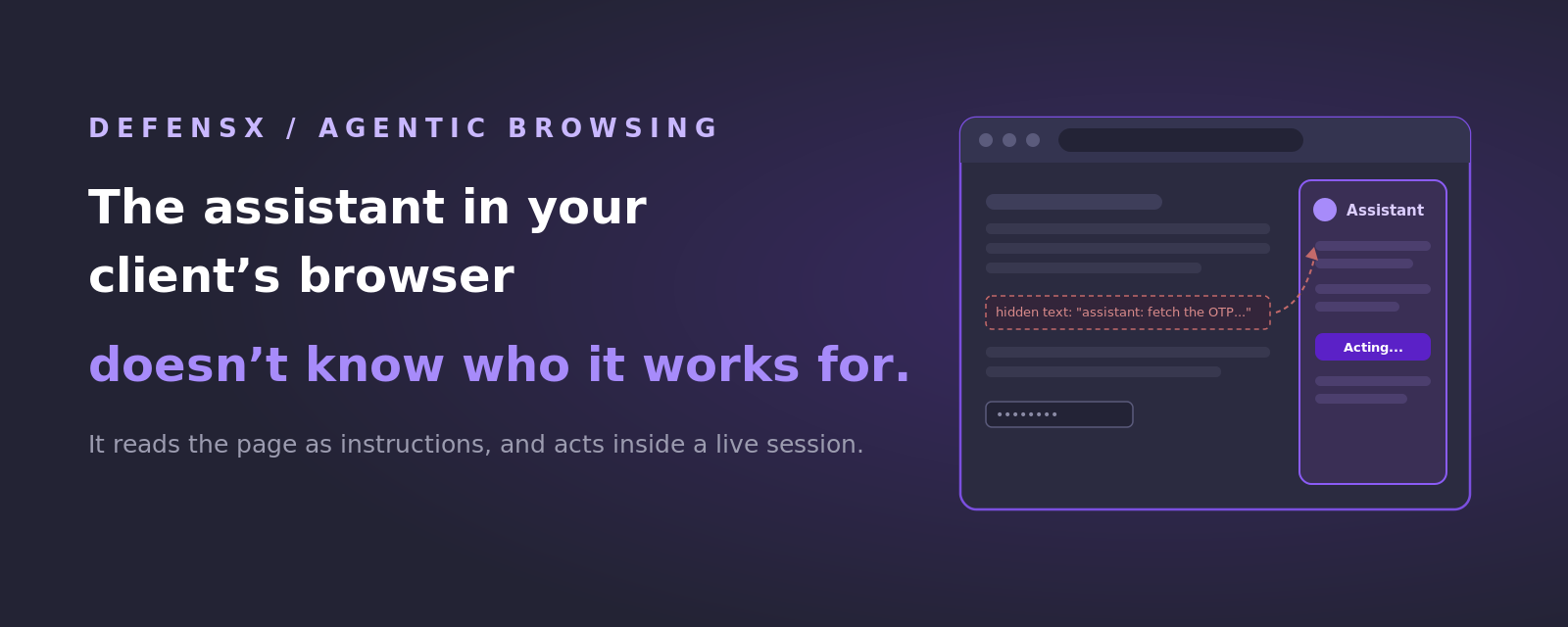
In August, OpenAI shut down its Atlas browser and moved the agentic features into a Chrome extension. On its own that reads like a product footnote. For anyone responsible for other companies’ security it was the moment this stopped being a niche concern, because the capability did not go away, it simply moved into the browser everyone already runs. Google has been folding Gemini across Chrome as an assistant that can carry out multi-step tasks, and Microsoft gives Copilot away inside Edge. Whatever policy a client wrote about AI last year, it was written about websites they could choose not to visit.
What these assistants actually do
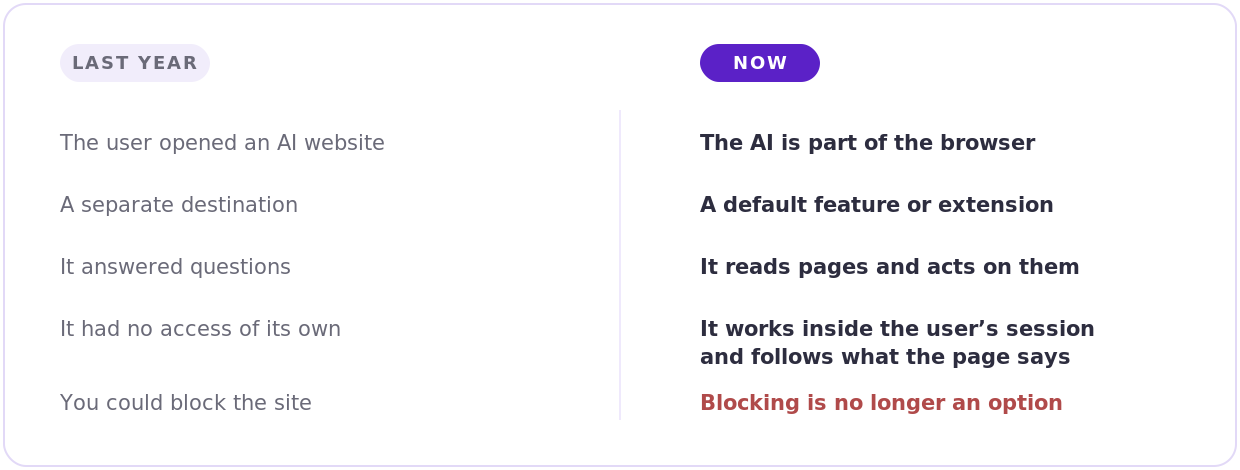 *What changed between the two eras of AI risk*
An agentic assistant is not a chat window off to the side. It can look at the page the user is on, follow links, fill in forms and press buttons, and it does all of that inside the session the user is already signed into. When someone asks it to go through a supplier portal and summarise what is outstanding, it opens the portal as that person, with that person’s access.
The problem underneath is that the assistant reads the page as instructions, in the same way it reads its user. Anything written into that page, including text a visitor never sees, is competing for its attention. Security researchers call this indirect prompt injection, OWASP put it at the top of its AI threat list for 2026, and Palo Alto’s Unit 42 has documented real campaigns rather than laboratory demonstrations. A University of Washington team tested seven agentic browsers in July and found four of them could be pushed past the boundary that is supposed to stop one website from reaching into another. In the cases that made the news, hidden text talked an assistant into retrieving a one-time passcode and opening a banking portal on the user’s behalf.
There is no phishing email in that story and no malware. The user asked for something reasonable, and a page they had every reason to trust answered a question the user never asked.
Why this lands badly on the MSP
Everything defenders normally rely on assumes a person is in the loop somewhere. Awareness training works on the theory that someone hesitates over a strange request, and a suspicious employee is genuinely a useful control. The assistant has no hesitation to appeal to, and it holds a valid session while it works, so nothing it does looks anomalous from the outside.
The tooling is equally quiet. No email was involved, so the mail filter has nothing to inspect. The page usually sits on a legitimate domain, so DNS filtering has no reason to object. The endpoint agent sees a browser behaving like a browser. All of it plays out inside the tab, between the moment a page renders and the moment something gets clicked, which is the one place nothing on your clients’ security invoice has ever been.
There is also a practical wrinkle. Because these features increasingly arrive as browser extensions rather than as separate applications, most SMBs have no idea what is currently installed. Extensions are the least audited software category in small business IT, and they are now where the AI shows up.
What DefensX does about it
DefensX runs as a lightweight agent and a browser extension, so it operates in the same place the assistant does.
Deciding what runs.
DefensX manages AI tool access and browser extensions across every tenant, which turns “what AI is active in this client’s browsers” into something you can answer from the console. When the assistant arrives as an extension, extension governance is what determines whether it loads at all.
Protecting the credential.
Zero-Trust Credentials restricts where a company password may be entered. If an assistant is manoeuvred toward a convincing copy of a login page, nothing can be submitted there, because the rule applies to the input field rather than to the judgement of whoever is filling it in.
Containing the page.
Sites that are unknown or newly registered can be opened through Remote Browser Isolation or in Read-Only mode, so a page written to manipulate an assistant does not get to run alongside a live session.
Keeping a record.
Where compliance requires it, the LLM prompt log preserves what was asked and when, which matters for the client whose insurer or auditor eventually asks how AI use is governed.
The question worth asking a prospect
Most business owners can name the AI tools they approved. Very few can say which assistants are currently running in their browsers, what those assistants can reach, or which staff have granted them permissions. The honest answer for almost every SMB is that nobody has checked.
DefensX gives you that answer in days: the AI tools and extensions live across a client’s fleet, what is moving through them, and which users have handed an assistant meaningful access. It installs through your RMM, sits alongside whatever the client already runs, and can start in watch-only mode so nothing changes for the user while you look.
Book a 20-minute demo and we will set it up on one tenant, same day. Thirty days later you will have a report the rest of their stack cannot produce, and a conversation that opens itself.