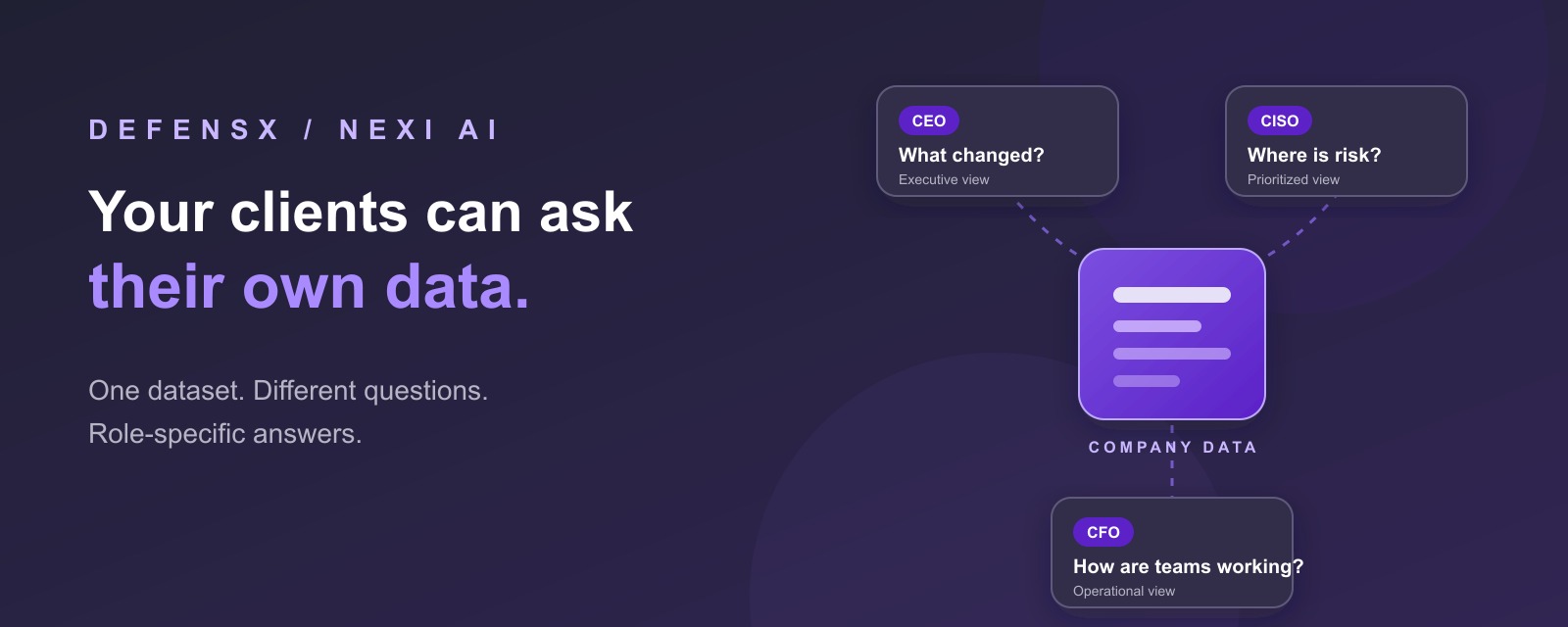
QBR conversations begin with business questions. The CEO wants to know what changed. The CISO wants to see where risk is concentrating. The CFO wants to understand whether the way people work is getting better or more expensive. Each question calls for a different view of the same company data.
The underlying signals already exist across the client’s security and browser activity. Finding the answer currently means opening several screens, choosing the right filters, exporting the results, and turning them into a story another person can understand.
That reporting gap is where Nexi comes in.
Dashboards answer the questions someone predicted
Every dashboard is a collection of decisions made in advance. Someone decided which metric belongs at the top, which date range matters, how activity should be grouped, and what the user is likely to ask next.
That works until the client asks something outside the menu.
“Which teams lose more than an hour each day switching across four or more tabs?”
“Where is user risk increasing, and what is driving it?”
“Which applications are taking more of the workday than they did last quarter?”
Each new question becomes a small reporting project. For an MSP, that project repeats across customers, personas, and review cycles. Every addition increases the dashboard count and leaves the path to understanding slow.
Faster understanding starts with the ability to ask a new question as soon as it appears.
Let the question build the report
Nexi turns a natural-language question into a structured report from existing DefensX data.
Nexi is the AI-driven reporting capability inside DefensX. It works with information already available in the platform, including browsing activity, time spent on applications and websites, file upload and download behavior, social media usage, unauthorized AI use, and risk data.
Nexi begins with data already available in DefensX, shortening the path from question to first report. One-click enablement builds on the platform’s existing data foundation.
The user describes what they need in natural language. Nexi turns the relevant data into a structured, interactive report with charts and visual findings that can be explored inside the interface.
The question becomes the starting point: “What do I need to understand?”
The question itself becomes the report brief. The MSP can respond as needs arise, and the client can focus on the business issue in familiar language.
One company, four different questions
The same activity can mean different things to different people. A uniform report often leaves each stakeholder searching for the part that matters to their role.
Nexi uses personas to adjust how information is presented for the role asking the question. Persona access can also be scoped to assigned departments, so the answer reflects the part of the organization that person is responsible for.
CEO
“What changed in how the company worked this month?”
An executive view highlighting the most important movement.
CFO
“Where are work patterns changing across departments?”
Application and website activity organized around operational questions.
ADDITIONAL STAKEHOLDER VIEWS
CISO
“Where is user risk concentrating, and what should I look at first?”
Prioritized risk with the activity behind it clearly visible.
HR
“How do application and website patterns differ between the departments I support?”
A department-scoped answer framed for a people and policy conversation.
One dataset can now support several decisions. Each stakeholder receives a view shaped around their role, and the MSP can reuse the same question-led workflow across audiences.
For the MSP, the question has to scale
A single client report is useful. A repeatable reporting method is a service.
Nexi AI for MSPs allows partners to move between customer environments, ask questions, and generate reports tailored to each customer’s needs. Each customer receives a tailored report through the same repeatable, question-led workflow.
Most MSP reporting friction comes from the effort required to turn available data into a client-specific answer across the customer base.
With Nexi, the MSP can start with a reusable question, apply it where it is relevant, and adjust the output for the customer and stakeholder in front of them. The result is a consistent process with client-specific answers.
A good question should keep working
Bookmark a useful prompt, schedule it, and receive the refreshed report by email.
Some questions deserve a regular place on the reporting calendar.
“What changed in user risk this month?”
“Which applications and websites saw the biggest movement this week?”
“What should this stakeholder know before the next review?”
After a prompt has produced a useful Nexi report, it can be bookmarked and scheduled to run daily, weekly, or monthly. Nexi runs the prompt again and sends the resulting report by email. Scheduled reports can be edited, tested, or turned off from one place.
A bookmarked and scheduled report keeps the answer moving between meetings. Nexi refreshes it automatically and gives the MSP a dependable client deliverable.
Ask once. Refine the question. Put the answer on a schedule.
The conversation stays with the data
Nexi operates within the DefensX environment and works with existing platform data.
Nexi keeps the conversation inside the DefensX environment.
Nexi works on data already available in the platform. According to the DefensX Knowledge Base, all processing happens locally on existing data, the data stays inside the platform, and users can delete their chat history at any time.
Enterprise-controlled consent keeps access scope-limited. Prompts and responses are encrypted at rest, and proprietary data stays outside external LLM training.
End users can receive Nexi access scoped to their assigned role and departments. A CEO, CTO, or CISO can ask questions and generate reports from the company data available within that scope.
Nexi gives business owners a controlled way to ask better questions of company data in its existing context.
Start with the question your dashboard cannot answer
Begin with the question that currently sends your team into exports, filters, screenshots, and spreadsheets.
Pick one customer. Pick one stakeholder. Write down the recurring question and the format that would make the answer useful.
Then let that question build the first report.
BRING US ONE CLIENT QUESTION
See how DefensX turns your data into a role-specific Nexi report.
In a 20-minute walkthrough, we will also show how that report becomes a scheduled client deliverable.